
ContrastWright™ Online
Version 1.0 · In Your Web BrowserCheck Text Contrast in PDFs, with Nothing to Install
ContrastWright™ Online checks the color contrast of the text in a PDF against WCAG 2.2, in your web browser. Sign in, choose a PDF, and get its report on screen, as an accessible PDF report, and as data.
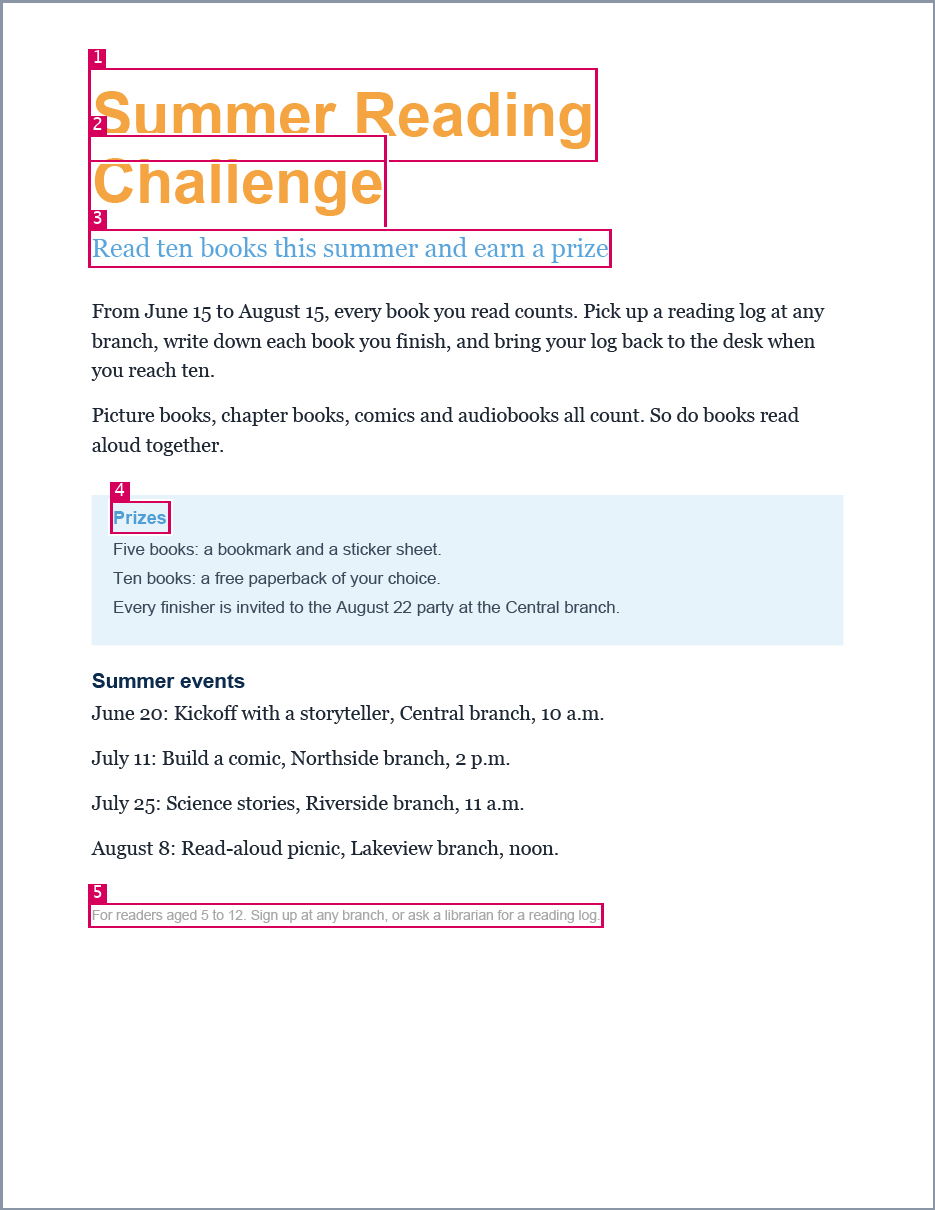
The report gives every failing color pair with a color of the same hue that passes, and draws each page that has a failure, the failing text outlined and numbered. ContrastWright Online never changes your file, and deletes it as soon as it has been checked.
To fix the failures in the PDF itself, use ContrastWright Studio, the desktop app that checks the same way.
See It Work
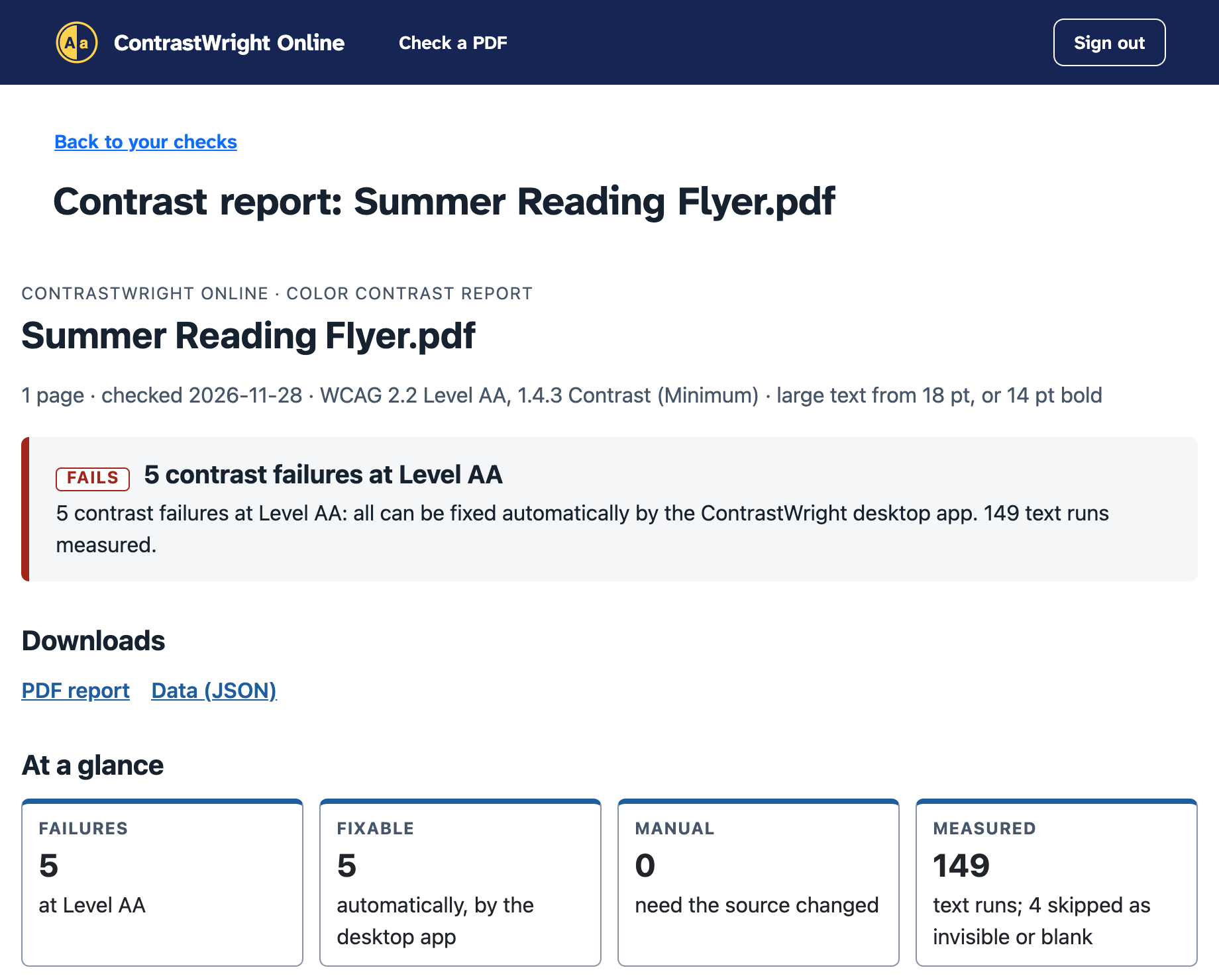
The Summer Reading Flyer, from the sample documents of a fictional county library, checked at Level AA in ContrastWright Online.
# What It Checks
For each piece of visible text, ContrastWright Online decides whether it meets WCAG 2.2 success criterion 1.4.3 Contrast (Minimum) at Level AA, or 1.4.6 Contrast (Enhanced) at Level AAA: 4.5:1 for normal text and 3:1 for large text at AA, 7:1 and 4.5:1 at AAA. Large text is 18 points, or 14 points bold, at the size a reader sees it.
The background is what is really behind the text: the bare page, or a shape painted behind it, and where the page content cannot settle it, as for text over a picture, a drawing of the page. Text whose background cannot be determined is reported as not measured, never as passing.
# The Report, Three Ways
- On screen: the result, the failing color pairs with the colors that would pass, and each failing page drawn, with a table of its failures.
- As a PDF report: the same findings, to keep or to send to whoever will fix the document. It is a tagged PDF, and passes its own contrast check.
- As data: every finding in JSON, with its page, place, colors, ratio and suggested color, for a spreadsheet or a tracking system.
# Your Files
Your PDF is checked on Appligent's server and deleted as soon as the check ends. Only its report is kept, for 30 days, so you can open it again; then it is deleted too. You can delete a report sooner, or your whole account with every report in it, at any time. Each report belongs to its account, and its download links work only on the page that shows it.
# Your Account, Secured
Turn on two-step sign-in, and signing in takes a code from an authenticator app on your phone as well as your password, with recovery codes for a lost phone. Keep your own computer signed in for 30 days, or sign in each time. Your account lists the browsers signed in to it, and Sign out everywhere ends them all at once. A note is emailed whenever your password, your address or your sign-in changes, and the most common passwords are refused.
# Accessible Itself
ContrastWright Online's own pages aim at WCAG 2.2 Level AA. Every control works from the keyboard alone, messages and a check's progress are announced as they appear, every color on the pages is measured with ContrastWright's own check, and the text is set in Atkinson Hyperlegible, a typeface the Braille Institute made for readers with low vision.
# What You Need
- A current web browser: Safari, Chrome, Edge or Firefox
- An account at contrastwright.cloud, made with your email address
- PDF files of up to 50 MB and 500 pages each, and up to 10 checks a day, with the checks used always shown
# Questions
Does it change my file?
Never. ContrastWright Online only reads it, and deletes it once it has been checked. To write a fixed copy, use ContrastWright Studio.
Do I need Adobe Acrobat?
No. Everything happens in your browser and on Appligent's server.
Is a clean report a claim of WCAG conformance?
No. It says that the text ContrastWright could measure meets the ratio of the level you chose. WCAG asks much more of a document than text contrast.
Can it check a scanned page?
A scanned page's words are part of its picture, so there is no text on it to measure. The report names such a page, so a clean result cannot hide it.
# Documentation
- ContrastWright Online Users Guide (42 pages) · PDF (873 KB): your account, checking a PDF, reading the report, and what happens to your files
- ContrastWright Studio Users Guide (79 pages) · PDF (3.2 MB): the desktop app, which also fixes
ContrastWright Online and ContrastWright Studio
Both check with the same ContrastWright tool, so they give the same answers about the same file. ContrastWright Online needs nothing but a browser; ContrastWright Studio, the desktop app, also fixes what it finds. The table below shows what each includes.
| ContrastWright Online | ContrastWright Studio | |
|---|---|---|
| Check text contrast against WCAG 2.2, Level AA or AAA | Yes | Yes |
| An accessible PDF report, with the failing pages drawn | Yes | Yes |
| The report as data, in JSON | Yes | Yes |
| Suggest a passing color of the same hue | Yes | Yes |
| Write a fixed copy of the PDF | No | Yes |
| Nothing to install | Yes | No |
| The PDF stays on your own computer | No: deleted once checked | Yes |
Can't decide? The great team at Appligent is here to help! Reach Out Now
Get Started with
ContrastWright Online
Sign in at contrastwright.cloud. Accounts are by invitation for now: email Appligent Sales for one.
Fix It With
ContrastWright Studio
ContrastWright Studio is the desktop app for macOS and Windows 11: it checks the same way, and writes a fixed copy. Contact us for more information.