
ContrastWright™
Version 1.0 · macOS & WindowsCheck and Fix Text Contrast in PDFs, on your Server
ContrastWright™ checks the color contrast of the text in PDF files against WCAG 2.2 from the command line, and can write a copy with the failing text recolored. It never writes over its input.
It fits any workflow that can start a process: an intake folder, a publishing pipeline, a nightly audit. Exit codes tell a script what happened, and one run can write its report as text, CSV and JSON at once. It is built on the Adobe PDF Library.
To check and fix files by hand, use ContrastWright Studio, the desktop app built on this tool.
Before and AfterOne Flyer, Fixed
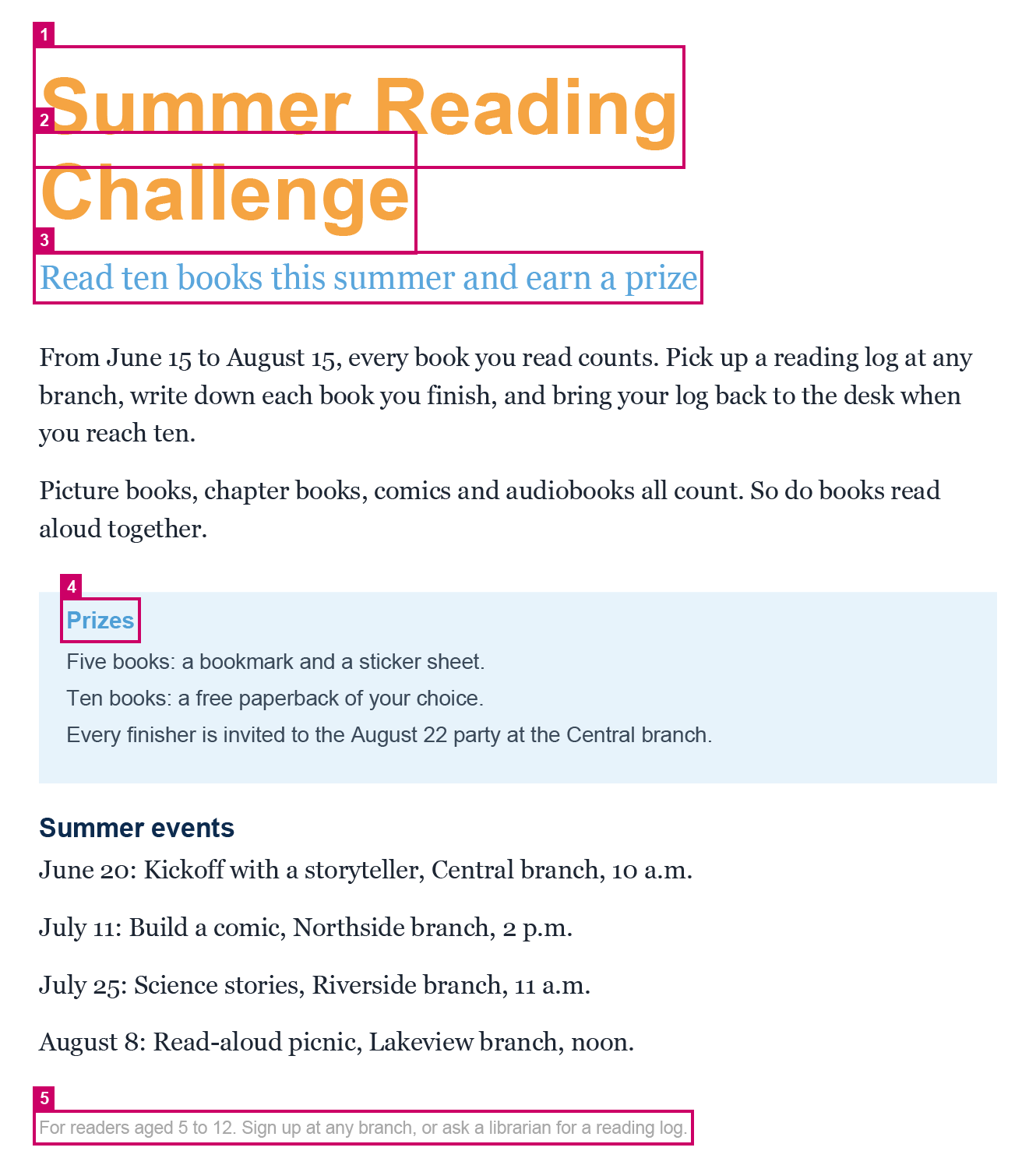
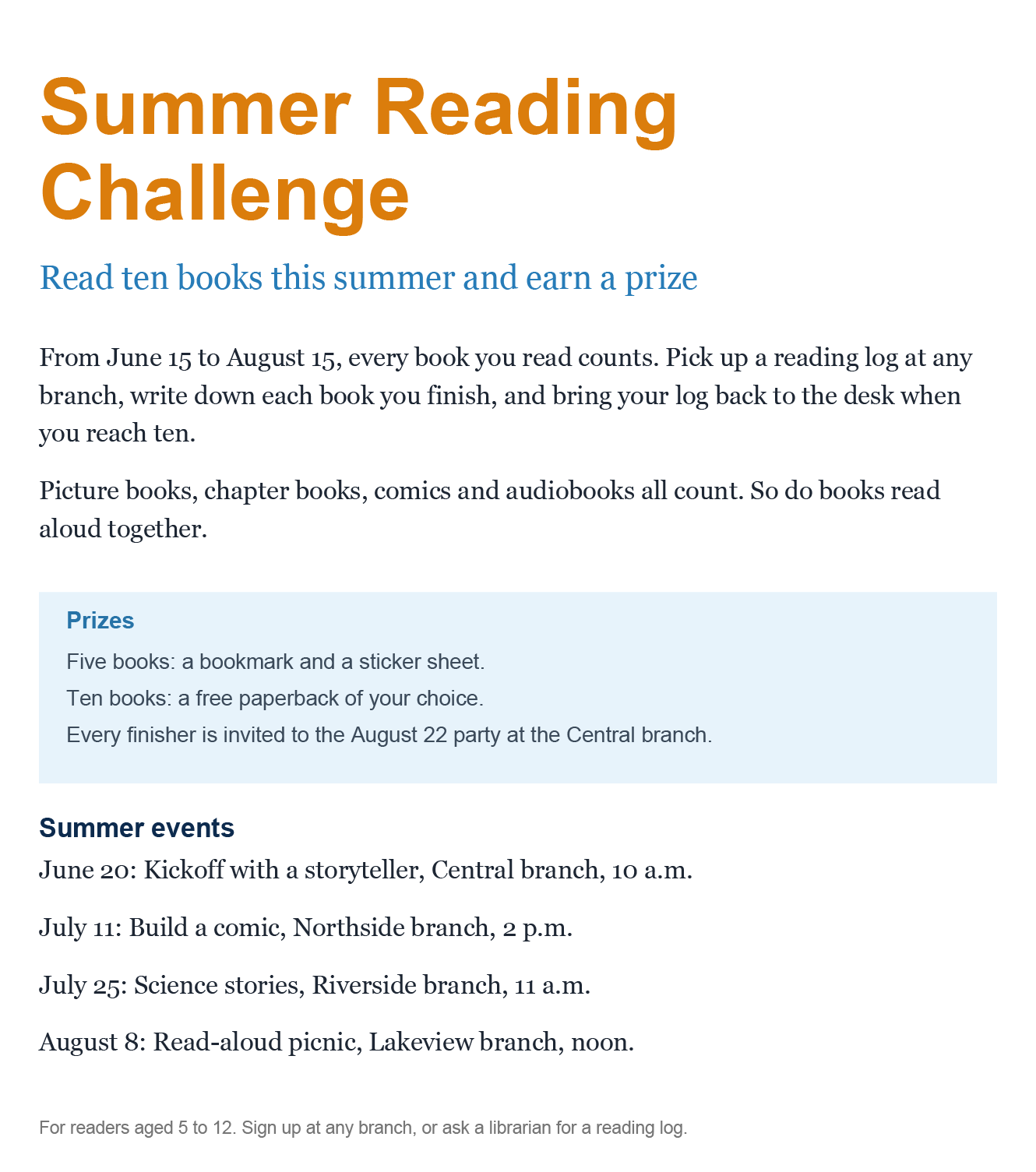
The Summer Reading Flyer, from the sample documents of a fictional county library: checked at Level AA by contrastwright check, then fixed by contrastwright repair. Click a page to see it full size.
# What It Decides
For each piece of visible text, contrastwright decides whether it meets WCAG 2.2 success criterion 1.4.3 Contrast (Minimum) at Level AA, or 1.4.6 Contrast (Enhanced) at Level AAA: 4.5:1 for normal text and 3:1 for large text at AA, 7:1 and 4.5:1 at AAA. Large text is 18 points, or 14 points bold, at the size a reader sees it.
Text a reader cannot see is skipped: invisible, blank, or hidden under a shape painted over it. So are a table of contents' dot leaders, which are decoration.
# See It Work
Check a PDF. The report names each failure, its colors, the ratio it reaches and needs, where it is, and a color of the same hue that passes:
contrastwright check -i flyer.pdf

Color contrast report: flyer.pdf
  pages 1   target WCAG 2.2 Level AA   large text at 18.0pt (14pt bold)
  text runs measured 149, skipped 4 (invisible or blank)

  5 failures, 0 warnings:

  Page 1
    C0001  1.4.3 (Contrast (Minimum), Level AA)
         2.04:1 for large text (#f5a442 on #ffffff); 3.00:1 required
         text: "Summer Reading"
         at [60.0 688.2 389.0 745.5]  40.0pt bold  backdrop page-default
         suggest #db7d0c (same hue) to reach 3.00:1
  …
The same check as a spreadsheet, one row for each finding:
contrastwright check -i flyer.pdf -f csv -o flyer.csv

id,page,severity,criterion,ratio,required,foreground,background,fontSize,bold,largeText,backdrop,suggested,…
C0001,1,error,1.4.3,2.04,3.00,#f5a442,#ffffff,40.0,yes,yes,page-default,#db7d0c,…
Write a fixed copy, and check it again:
contrastwright repair -i flyer.pdf -o fixed.pdf

Recolored 32 text runs on 1 page
Wrote fixed.pdf

contrastwright check -i fixed.pdf

  No contrast failures found.
Judge one color pair, without a PDF:
contrastwright contrast --fg "#a8a8a8" --bg "#ffffff"

{"fg":"#a8a8a8","bg":"#ffffff","alpha":1.0,"fgDrawn":null,"large":false,"wcagLevel":"AA",
 "ratio":2.377865589247898,"required":4.5,"pass":false,"suggested":"#767676",
 "suggestedRatio":4.542224959605253, …}
Draw a page as a PNG picture, with the numbers that map a finding's position onto it:
contrastwright render -i flyer.pdf -p 1 -o page-1.png

{"page":1,"pageCount":1,"dpi":96.0,"width":816,"height":1056,
 "matrix":[1.3333282470703125,0.0,0.0,-1.3333282470703125,0.0,1055.9959716796875], …}
# Measured Against What Is Really Behind the Text
The background comes from the page content first: the bare page, or a shape painted behind the text. Where the content cannot settle it, as for text over a picture or a gradient, the tool draws the page and measures what is there. Text whose background still cannot be determined is reported as not measured, never as passing.
# Repair, Safely
repair changes the color of failing text, and nothing else. Each new color keeps the text's hue, is written in the text's own color space, and is only as much darker or lighter as the ratio needs.
Text in a spot ink, and text whose background was measured from a drawing of the page, are left for a person, with a suggested color. The output is always a new file: a repair never writes over its input.
# A Reviewed Repair
check --emit-ops writes the changes a repair would make, one for each color pair, to a file a person or a program can review: approve or leave out each change, or choose its color. repair --ops then makes exactly those changes.
For large text, the Outline fix keeps the text's own color and outlines its letters instead. --max-shift limits how far any color may move.
# One Color Pair, One Page
contrast judges any color pair at once, without a PDF, and suggests a color of the same hue that passes. render draws a page as a PNG picture, with the numbers that map a finding's position onto it.
# For Scripts and Pipelines
Exit 0 means no failure was found, 2 that a failure was, and 1 that the tool could not do what was asked. Exit 0 is not a pass by itself: the tool also exits 0 when some text could not be measured, or none was, so read the measured counts in the report.
One run writes its report in several formats, text, CSV and JSON, and contrast and render print one line of JSON that a program can read whole.
# Supported Operating Systems
- macOS 15 Sequoia or later, on Apple Silicon
- Windows 11, 64-bit
# Questions
Do I need Adobe Acrobat?
No. ContrastWright is a self-contained command-line tool, built on the Adobe PDF Library. You do not need to install or license Acrobat.
Does it change my file?
Never. check only reads, and repair writes a new file. A repair never writes over its input.
Is a clean report a claim of WCAG conformance?
No. It says that the text the tool could measure meets the ratio you asked for. WCAG asks much more of a document than text contrast.
Can it check a scanned page?
A scanned page's words are part of its picture, so there is no text on it for the tool to measure.
# Documentation
- ContrastWright Command-Line Guide (68 pages) · PDF (880 KB): every verb and option, the reports, and scripting
- ContrastWright Studio Users Guide (79 pages) · PDF (3.2 MB): the desktop app built on the tool
- What ContrastWright Studio does (2 min): a short video of the desktop app, on YouTube, with captions and a transcript
ContrastWright and ContrastWright Studio
Two products, one tool. ContrastWright runs unattended from scripts and servers; ContrastWright Studio is the desktop app for checking and fixing files by hand. Both get every number from the same contrastwright tool, so they give the same answers. The table below shows what each includes.
| ContrastWright | ContrastWright Studio | |
|---|---|---|
| Check text contrast against WCAG 2.2, Level AA or AAA | Yes | Yes |
| Write a fixed copy, each color keeping its hue | Yes | Yes |
| Review each change, choose your own color, outline large text | Yes, in a review file | Yes, on screen |
| Reports as text, CSV and JSON | Yes | Yes |
| An accessible PDF report, with the failing pages drawn | No | Yes |
| See each failure on its page | As a PNG (render) | Yes |
| Run unattended from scripts and servers | Yes | No |
Can't decide? The great team at Appligent is here to help! Reach Out Now
How to Buy
ContrastWright
ContrastWright runs unattended on your own servers, on macOS or Windows. Contact us for more information.
How to Buy
ContrastWright Studio
ContrastWright Studio is the desktop app for macOS and Windows 11, built on the same tool. Contact us for more information.